No matter how sophisticated your analysis techniques are, if you analyze messy data, you’ll get messy results. Data cleaning helps ensure you get trustworthy results and often includes steps like normalizing values, labeling blank values, re-organizing data, and otherwise refining data before analysis.
Before you start cleaning, lock down your original data and only make changes to a copy. Making changes to data files always involves risk. Don’t risk your only copy.
Formatting Values in Any Type of Data
- Format dates as YYYY-MM-DD whenever possible to ensure they sort in chronological order.
- Label data that you know is missing instead of just leaving empty spaces.
- 0 (We took a measurement and it was zero.)
- NA (Not applicable or not available in this case.)
- NULL (There should be data here, but we didn’t collect it.)
- Blanks (Should there be data here? This needs to be investigated.)
- Always check to see if your software has a standard code for labeling missing data. Many do.
- For important terms, use a controlled vocabulary to make sure they’re spelled consistently. For terms that are widely used, see if a standard code is available, for example, a taxon identifier for species names.
Cleaning Tabular Data
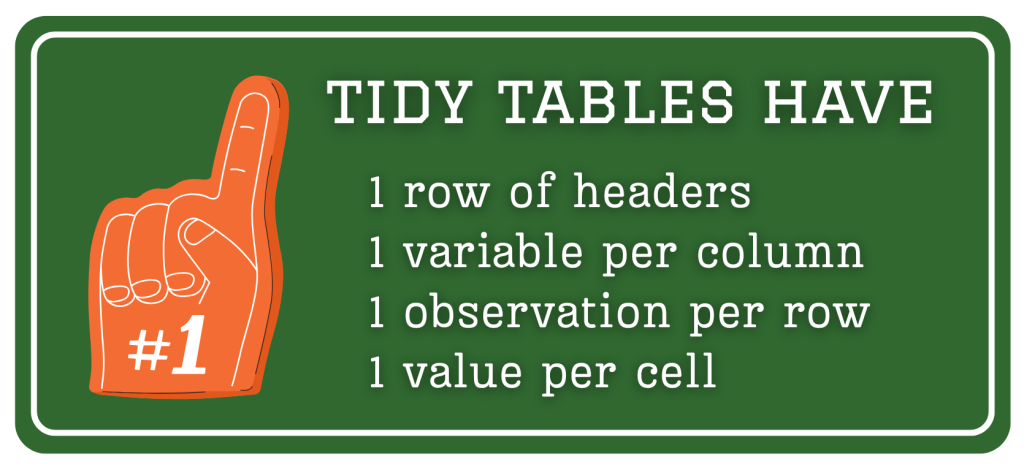
Data tables should be structured around the things you want to analyze – variables, observations, and values. Each column should represent one variable, each row should represent one observation, and each cell should represent one value. Take this weather data for example:
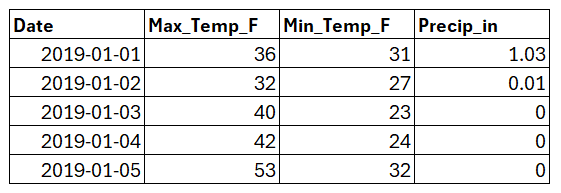
The variables (or columns) are date, maximum temperature, minimum temperature, and precipitation. One observation was made per day, so each date gets one row. Each value also gets its own cell, which makes this data tidy and ready for analysis. Furthermore, the headers are confined to the top row, which works well with most analysis programs. For more on tidying tabular data, see Hadley Wickham’s classic article.
Consistent Columns
In the weather data above, notice how each column contains one type of data with consistent formatting. All of the dates are formatted as YYYY-MM-DD, temperatures are recorded as integers, and precipitation measurements include decimals. Restricting each column to one type of data makes analysis much easier. Researchers often break this consistency by mixing notes in with other kinds of data. If you need to make notes, avoid sprinkling them throughout your data table. Instead, designate a notes column and record them there.
Value Ranges
It’s also worth checking the range of values for each variable. These could be definite ranges where there are no exceptions (e.g., a Likert scale question with choices 1-5), or probable ranges where there might be some exceptions (e.g., the ages of high school students). Explore the ranges in your data and check highest values, lowest values, and averages. Do they match what you expected? If not, investigate to find out if there are errors in your data or just some surprising but valid values.
OpenRefine
OpenRefine is free, open-source software with powerful features for cleaning tabular data. It’s especially helpful for grouping values, including text that’s similar but not exactly the same (e.g., Illinois, illinois, and Illinos). Once it finds near matches, you can opt to standardize them with a few clicks. The University of Guelph has a lovely tutorial explaining how to use OpenRefine.
Cleaning Text Data
Most text analysis tools work best with plain text (txt format). Plain text is exactly what it sounds like – just text without any of the formatting options that make documents look nice. If your text is in Word, Google Docs, or something similar, you can convert it to plain text by saving a new version of your file in a text editor like Notepad (on a PC) or TextEdit (on a Mac).

Most errors in text data are inconsistencies that impede analysis. Common inconsistencies include extra spaces before and after words, divergent spellings, unwanted punctuation errors, and varied capitalization. In some cases, these inconsistencies are an important aspect of the analysis and should remain in the data. Just be intentional about the inconsistencies you keep.
Small datasets can be cleaned using a text editor with a find/replace function. For larger datasets, cleaning can be semi-automated using code and regular expression syntax, or regex, which can search for patterns in text like capital letters, the first and last letters of words, numbers, punctuation, spaces, and line breaks. For coding help, see the consultations and trainings provided by the University’s Data Analytics team.